Powered by Blogger.
Showing posts with label gadgets. Show all posts

This $400,000 Pocket Watch Can Run for 1,000 Years

The Uwerk Zeit Device UR-1001, which retails for 345,000 Swiss Francs ($400,000), is one the world's most exquisite, intricate and expensive pocket watches. It's a watch lover's holy grail.

Swiss watchmaker Uwerk, which specializes in brawny-looking, high-end mechanical watches, unveiled the UR-1001 last year, but the device remains something of a wonder today.
Uwerk Pocket watch That Can Run for 100 years

Sporting 51 jewels, the UR-1001's steel body encases a modern marvel of mechanical expertise. It uses an usual set of gears and cubes to display accurate months and dates for an entire year and also features a day/night indicator. In fact, the mechanical "programming" even lets the watch accurately change dates between months with 30 days and months with 31. According to the video above, you'll only have to adjust the watch date once a year: in February, which usually lasts only 28 days.

The most impressive part about the UR-1001, which measures 4.17 inches x 2.44 inches x 0.9 inches, may be Urwerk's estimation of its lifespan. On the back is a 100-year dial; when it hits 100 years, a second linear calendar counts centuries, up to a full millennium. Just imagine an iPhone or Galaxy device with a similar dial.

Perhaps the UR-1001's only drawback is that it's not a self-winder. It can run 39 hours on a single wind, though, and its power reserve indicator includes a "red warning" zone to remind its owner when the pocket watch needs winding.

New Frames For Google Glass, Prescription Lenses

Though Google glass's main appeal lies in the camera and the smart circuitry located above the right eye, at the end of the day smart-glasses are still glasses, and users would like to have options when it comes to frames and lenses.
Google has announced the Titanium Collection for Google Glass


Well, now they do. Google has announced the Titanium Collection for Google Glass, with four new extra-light titanium frames as well as two new styles of twist-on shades.

The new frame styles, which functions pretty much as your regular prescription frames, are named Split, Thin, Bold and Curve. Twist on shades are now available in a total of three varieties: Edge, Classic and Active. And even if you're not entirely satisfied with the choice, worry not: Google claims more styles will be coming.

The new styles will be available to Explorers (users who've participated in the Google Glass beta program) as a $225 upgrade option Tuesday afternoon. Qualified users who need prescription lenses and have vision insurance from VSP can get subsidized frames and lenses.
Source: Mashable

Lifeband Touch: LG Fitness Wristband Tracker

Here is a wearable gadget "Fitness Wristband Tracker" that LG announced at the 2014 International CES show, a version of its own with with some little changing in design with a touchscreen interface.
Lifeband Touch: LG Wristband Fitness Tracker

Here is a wearable gadget "Fitness Wristband Tracker" that LG announced at the 2014 International CES show, a version of its own with with some little changing in design with a touchscreen interface.

Called the LG Lifeband Touch, the device tracks distance walked, speed, calories and other typical data collected by activity trackers, but it also comes with an OLED display, manages incoming calls and can be used to control your music. 

This data can be accessed by swiping a finger over the display, similar to how you would use a
touchscreen; tablet or smartphone.
Fitness Wirst Band by LG

With the help of a motion-sensing algorithm, the device automatically turns on the display when the user rotates their wrist.

But one of the most compelling parts of the Lifeband Touch is how it connects to a smartphone via Bluetooth to receive data from third party devices, including the company's new heart rate earphones.
Images: LG

Rideye Video Camera for Bikes

Rideye Video Camera for Bikes

Rideye cameras will now feature twice the video history— 2.5 hours instead of the original 1.25 hours. The campaign is on track to hit quantities much higher than originally anticipated, which allows the purchase of components at a lower cost. All past and future pledges are eligible.

Cycling through heavy traffic just got a little less risky with Rideye camera surveillance, which documents bike accidents in HD, much like how black boxes are used to investigate the causes of airplane crashes.

As a mechanical engineer and avid bike rider, Cedric Bosch created Rideye to make cycling safer for everyone. After working on the project for the past year, Bosch launched a Kickstarter campaign this month to help move it into production. Initially, he became inspired to create Rideye after his best friend was seriously injured in a hit-and-run bike accident last year. Rideye's automatic video footage would identify hit-and-run drivers, and help prevent false claims.

"This is one of those products that people have been wanting for years, but nobody has made until now. People love to bike — it's an insanely popular sport — and biking to work is getting more and more popular each year. But everybody has this lingering fear that they'll get hit by a car, and the driver will drive away and never be found. Rideye solves that problem, and lets people ride with total peace of mind," Bosch told media.

Rideye' s bike-friendly features include a one-touch power button, 24-hour battery life and easy install on handlebars. If the camera is turned off at the time of a crash, accident-detection sensors will automatically begin to record, and once the camera's 4 GB internal memory or 1.25 hours of video time is filled, it will auto-delete the oldest content. With a USB plugin, camera footage can be saved to a computer.
Rideye Camera for Bikes

As of Thursday, Rideye became one of the most popular Kickstarter technology projects. With over 150 Kickstarter backers, Bosch is enthusiastic that the campaign will exceed its $32,000 goal. A Rideye camera is now available for $99 to Kickstarter backers, although the retail price will eventually be $149. The campaign has until Oct. 10 to gain more supporters. Rideye plans to go into production this fall, and send shipments from November through December.

"At this point, I am targeting a new goal— $100,000 (three times the original). We have some great stretch goals that we will unveil halfway through the project," Bosch said.

LED Light Up Shoelaces

Glowong LED Shoelaces

The latest LED light source plus high transmission fiber, smooth effect more strong, effect is far superior to the plastic pipe material products, through the CE ROHS authentication, waterproof processing, etc. Its really an impressive gadget and anyone would wish have this one, even me too. 

It is suitable for the all kinds of shoes like roller skates, dance shoes, basketball shoes, football shoes, children shoes, casual shoes, sports shoes, suitable for outdoor sports, night running, large festival party, concert, promotion, encouragement and other activities. These are just Perfect for night wearing. Its cost is almost $2.36. 

Fashion / Magic LED Flashing Shoelaces:


This gadget has Unique style, Ultra bright and eye-catching, for they are the shoelaces can light up and flash! LED back-lit offers safe, thin, comfortable and non-intruding light which has 

3-mode flashing: 


It has 3 different modes i.e Steady on, fast strobe, slow strobe

Battery Timing: 


Flashing or intermittent discharge is 60-80 hours, 2-3 months of normal use, the battery can be replaced
Powered by 1 x CR2032 battery.

Other Specifications: 


  • Net Weight: 40g
  • Shoelaces Length: 80 cm / 31.4 inch
  • Light source: LED
  • Shoelace material: Glass fiber
  • Control box material: plastic
Glowing Shoelaces

Glow in the Dark with LED Shoelaces

Eye Tribe Tracker - Eyes Tracking Gadget

Eye Tribe Tracker - Eyes Tracking Gadgets

The Eye Tribe Tracker is an aftermarket eye tracker currently available for Windows-based tablets and computers and serves many functions from gaming to reading. Built to work with any Windows 7 or 8 device with a USB 3 interface, The Eye Tribe Tracker allows users to navigate, interact and actuate software running on the device, purely by tracking eye movement or by a combination of eye tracking and touch. 

The first iteration of this device comes with a Windows SDK so developers can begin to learn how to code Windows apps that use the device. Android and iOS versions of the kit are planned to follow in early 2014.

We first told you about this inexpensive eye tracking device about a week ago when they opened up pre-ordering for the Surface Pro version on September 6th. However, I had a chance to speak with company partner Sebastian Sztuk — an engineer by trade and maker of most of the company’s prototypes — at TechCrunch Disrupt SF 2013. He showed me a pretty cool demo and let me know that the company’s strategy is actually larger than the external unit we tested.

If this external Tracker — which is mainly focused on developers  — is Horizon 1 for their company strategy, Horizon 2 is consumer focused and has sights set on direct hardware integration. In fact, the company is in negotiations to come out with their own tablet with built in eye-tracking software and hardware and then ultimately a spec so any hardware maker can integrate.

A prototype of that vision is shown below (created for Android OS and running on an existing Samsung tablet).


I’ll admit, just thinking about using The Eye Tribe Tracker brings thoughts of eye strain to mind. However in speaking with Sebastian, he declared that after a brief, one time calibration, their technology is really just tracking the things your eyes are already doing anyway as you interact with the tablet. So I guess there’s not much to dislike here.

The concept was obviously compelling to some other people at Disrupt because the company took home the Big Data Startup of the Year awarded by SAP, worth over $40,000 is goods and services from the software giant. — techcrunch

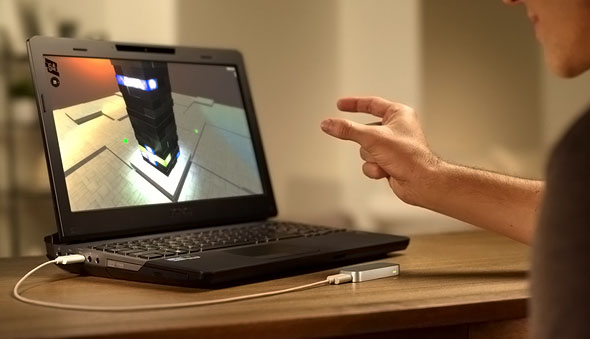
Leap Motion Controller Review

Leap Motion Controller Review
Leap Motion Controller

Few products have generated as much hype as the Leap Motion gesture controller over the past couple of years; none have so miserably failed to live up to their billing. Although it’s posited as a device that allows you to control your PC with the waft of a hand, we found the Leap Motion actually delivered a fist-gnawingly frustrating experience.

In theory, the Leap Motion Controller allows you to navigate your desktop via natural pointing gestures, and to select items on the screen by poking towards them. In our tests, on a variety of laptop and desktop PCs, we did indeed find it just about possible to scroll through the Windows 8 Start menu by waving a hand in front of the screen.

Even with a steady hand, however, we found the onscreen pointer often wobbled uncontrollably, while at other times it was impossible to target items at the edges of the screen, or to locate the pointer at all. And while the Leap Motion Controller theoretically offers multiple screen support, we had the devil’s own job trying to shift the pointer from our main desktop monitor on to a secondary laptop screen. No degree of fiddling with the software’s numerous accuracy and calibration settings resulted in a satisfactory experience.

Another big problem was selecting items. The Leap Motion sensing area is divided into two zones: the “hover zone”, away from the monitor, where the device recognizes gestures, and the “touch zone”, which detects the equivalent of left mouse-button clicks. The invisible dividing line between these two zones is directly above the sensor, but we found we had to dangle a finger in the touch zone for a good couple of seconds for a “click” to be recognized. It’s a slow process, and trying to accurately select a small item – such as a link on a web page, for example – borders on the impossible.

The problem in part is that the Leap Motion Controller is quite a rudimentary device. Whereas Microsoft’s Kinect uses a combination of RGB camera, depth sensor and motorized pivot to accurately track the motion of the user’s entire body, Leap Motion relies purely on two cameras and three infrared LEDs mounted inside a static 3in box.

The problem in part is that the Leap Motion Controller is quite a rudimentary device. Whereas Microsoft’s Kinect uses a combination of RGB camera, depth sensor and motorized pivot to accurately track the motion of the user’s entire body, Leap Motion relies purely on two cameras and three infrared LEDs mounted inside a static 3in box.

The problem in part is that the Leap Motion Controller is quite a rudimentary device. Whereas Microsoft’s Kinect uses a combination of RGB camera, depth sensor and motorized pivot to accurately track the motion of the user’s entire body, Leap Motion relies purely on two cameras and three infrared LEDs mounted inside a static 3in box.

[source: PcPro]

Future Camera D Can

Future Camera D Can


Meet the D-Can, a concept camera that resembles a military-grade spotting scope equipped with long-zoom capabilities. Straying from traditional camera designs (though it’s somewhat similar to the Lytro camera), designer Jean-michel Bonnemoy believes the form factor of today’s cameras should be updated to a cylindrical design for better ergonomics. 


This concept snapper features an ISO range of 100 to 6,400 and comes with a long-zoom lens coupled with image stabilization capabilities. Its lens cap doubles as an electronic flash–capable of firing an AF-assist beam at the same time. 
Future Camera D Can

When the camera’s in use, shutterbugs can either utilize a hooded magnifier to frame compositions or choose the camera’s Live View function via a high-definition LCD display. Auto focus can be further fine-tuned using the snapper’s on-board trackball. It also comes with external ports that allow users to equip the device with an audio headset, a stereo microphone, and an external power supply. 
D Can Future Camera

Should the D-Can become a reality, we wonder if one would be able to store it in a pocket comfortably due to its elongated shape.

[via: t-future]

Power Dock 5 - A Family Charging Station

Power Dock 5 - A Family Charging Station

When you have a lot of USB-chargeable portable devices to charge then you either have USB chargers scattered all round the house or a single location with a potential tangled nest of cables. 


The Power Dock 5 from Griffin can tame the charging cables into one neat, sleek charging station with room to corral and charge five devices at once. This station takes up about the same area as a tablet, but it has five charging bays with USB ports. Each port provides 5V at 2.1A, so each can handle even a power-hungry tablet. 

The bays are large enough to accommodate devices in their cases. Because you provide your own cables, you know the Power Dock 5 is compatible with any USB-chargeable device you own now or in the future. The Power Dock 5 is available now at Griffin for $99.99.

Aqua Farm Gadget for the lazy green-thumb pet owner

Aqua Farm Gadget for the lazy green-thumb pet owner

What if the “chores” of maintaining a fish tank and herb garden suddenly took care of themselves, allowing you more time to, well, do just about anything else? 


The Aqua Farm from Back to the Roots is a closed loop eco-system that does just that! Your fish does his little fish thing on the bottom and the filter recycles the fish waste, water, and tank scum up to fertilize the fresh herbs and plants growing above. It’s aquaponics in action! That just leaves you to admire and feed your fish, while eating your new supply of organic herbs.

Keep Herbs Fresh for Longer with the Herb Savor

Keep Herbs Fresh for Longer with the Herb Savor

If you wish to use herbs in your cooking but you’re tired of how quickly those expensive packets from the grocery store wilt, you need the Herb Savor from Prepara. The Herb Savor has been proven to keep herbs fresh for up to three weeks. 


You just place the herbs in the basket with stems pointing down, rinse them, stand the basket in the base that’s been filled with fresh water, and place everything in the refrigerator. The Herb Savor also works to keep asparagus fresh. 

Hacked Microwave Scans Food Barcodes for Cooking Instructions


Tired of keying in commands for his microwave to follow, Nathan Broadbent decided to program his so it could accept voice commands — as well as scan product barcodes to determine how long they should cook.


Broadbent is a Ruby On Rails developer in his professional life, as well as his personal life. These skills combined with the hacker's favorite micro-computer (Raspberry Pi), was what allowed him to turn a regular microwave into something special.

A couple of the Raspberry Pi Microwave's features include voice commands, a clock that updates itself using the Internet and even custom sound effects for those who don't find the factory-set beep all that palatable.

The most impressive of these, however, is the barcode scanner that can pull cooking instructions from an online database, meaning you don't even have to set the microwave half the time. What's more impressive is the fact that there was no such database in existence, so Broadbent decided to build one of his own.

While it would have been enough to include all these custom features, Broadbent also made it possible to control the microwave using your phone.


One possible use is pre-loading a meal that you can start cooking when hunger strikes from another room. The microwave will even send you a Tweet when your food is ready, just in case you don't hear the beep.


There's no denying this is a complicated project to pull off, but the convenience could be reason enough to give it a try. There's even a video on Broadbent's of explaining some of the finer details and cooking — wait for it — a raspberry pie.

via: mashable

iPad 2: Top 5 problems that users are facing


By: Aseem Gaurav, March 25, 2011 (New Delhi)

The iPad 2 has an incremental upgrade over its extremely popular predecessor. It's a little thinner, a little lighter, has got powerful processor along with two cameras. These are all notable improvements, but if you haven’t still bought an iPad and want to look at all aspects of the Apple’s latest computer tablet before making a purchase decision, then read on!

Wi-Fi issues

Some users have complained about the iPad 2's Wi-Fi radio. Just like the original iPad, the newer version seems to have trouble staying connected on wireless networks. Some users claim that they have to stand close to a router to obtain a signal.


Backlight 'bleeding'

Some early iPad 2 customers have noticed that the blacklight "bleeds" from behind the LCD panel. The problem has been reported by some users who say while viewing dark images, the light leaks alongside the edges of the screen.


Yellow tint on screen

Some users have voiced their concerns over a yellow tint on the iPad 2's display. Experts say the yellow discoloration on the screen is likely temporary and is expected to disappear after some days of usage, as was evident in the case of iPhone 4 when it was first released.

Microphone distortion (with 3G models)

It appears to be that a WiFi-only unit recorded better-quality sound than a unit with WiFi and 3G. Further the GSM 3G model's audio to be slightly preferable to that of the CDMA model.

FaceTime freezing

As iPadfanzz reported in its earlier posts, users sometime face FaceTime video chat freeze problem. Users wrote that FaceTime sometime show a frozen image from a previous video chat session – even after restarting the app. According to them the problem rectifies itself when switching the device off and then back on.
 

Popular Posts