Powered by Blogger.
Showing posts with label technology. Show all posts

Mercedes-Benz Self Driving Future Truck

We are living in the 21st century and have not invented self driving or exactly hover cars yet. But there is also a good news that a world known vehicle company Mercedes-Benz is going to introduce Mercedes-Benz Future Truck. 

Hopefully it would not remain a concept in the next few years because many auto engineers have revealed prototypes with autonomous technology and Mercedes-Benz is taking it step forward. 

Daimler (parent company of Mercedes-Benz) has just announced the planning to launch a self-driving truck by 2025. They named it Mercedes-Benz Future Truck, and it could bring revolution to freight distributing safely and more efficiently while lowing fuel consumption.

This Future Truck will use four radar sensors and two cameras to transmit information to the systems for adaptive cruise control like automatic braking, stability control and lane-keeping assistance.

As of right now the truck can drive itself at up to 55 mph speed, but it will be enhanced until the technology is ready to give the truck the ability to change the lanes itself. The Future Truck recently completed a drive on a section of the A14 autobahn in Germany, where the truck drove at the speed up to 50 mph in front of media, government's officials and investors.


“Autonomous driving will revolutionize road freight transport and create major benefits for everyone involved,” stated by the member of Daimler’s Board of Managements Dr. Wolfgang Bernhard who's responsible for Daimler Buses and Trucks. 

“With the 2025 Future Truck, Daimler Trucks is once again highlighting its pioneering role in innovative technologies and opening up a new era in truck transport.”

Images via: trucknews, inhabitat, 

pd.id: Test Your Drinks To Avoid date Rape Drugs

pd.id is the solution of date rape drugs that are shockingly commonplace in nightclubs, college campuses, and parties across the world. These drugs can be odorless and tasteless, so the only way to completely avoid contamination is to refuse any drink offered to you. 
pd id: Personal Drink Identifier

To help solving this problem, a team from Toronto is crowd-funding the pd.id — the “personal drink ID.” With a device the size of a thumb drive, anyone can test to see if a drink has been tampered with.

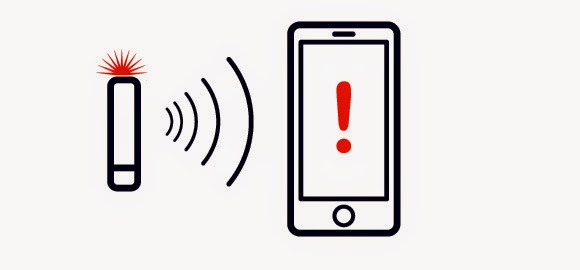
Using its built-in sensors, the pd.id tests the light spectrum, conductivity, and temperature of any drink. After submerging the tip of the device for a few seconds, it checks the data against a local database of drink profiles, and it lights up either a green or red LED depending on the safety of the drink. Once rinsed, the device can be used again — up to about forty times on a single battery charge.

Even better, the pd.id can be paired with iOS, Android, or Blackberry smartphones for a more in-depth explanation about what the test found. Dedicated one-time-use testing kits do exist for specific drugs, but they simply don’t offer the same utility and versatility of this reusable gadget.

Currently, the pd.id team is running a crowdfunding campaign on Indiegogo in hopes of raising $100,000 by August 30th for a full-fledged release in April 2015. If the campaign raises $250,000, the team will partner with an “international women’s cause,” and donate 100 units. 

At the $500,000 level, the team will implement the ability to detect the nutritional content of a drink — especially useful to help diabetics detect sugar content. Finally, if the campaign raises $750,000 the team will develop an application dedicated to avoiding and reporting unsafe situations and establishments.
pd-id demo

If you want a pd.id device for your very own, you’ll need to pony up $100 on the Indiegogo campaign, but that’s just the start. If you or your organization want to make an even bigger difference, the higher support tiers allow for hundreds of these devices to be distributed to at-risk communities. 

At the $10,000 perk tier, 200 pd.id devices will be donated to the community of your choice. At the $50,000 level, 1000 pd.id will be donated to the university of your choice for freshman orientation packages.
pd-id specifications

Whether you plan on using this yourself, giving it to your kids, or donating to college students, this device is important both culturally and practically. This tool empowers at-risk men and women, and works to thwart abusers and rapists — a truly noble goal. This isn't just a cool gadget, it could be a life changer.
source: ExtremeTech

4 Must Have Camping Gadgets

Gadgets and gears are becoming very common among adventure lovers, nowadays there are so many essential gears in the market but it’s difficult to decide that which one is best and more essential gadget for your camping activity. 
4 Must Have Camping Gadgets

Here is a useful guide for camping gadgets that can help you a lot by saving your time. Camping gadgets are now available everywhere and you can grab that from your nearest market place. But as It is 21st century and now people can buy online from everywhere around the world. 

1. Hand Mount Light


Hand Mount Light Tool | Camping Gadgets

It’s a hand mounted light just like as a wearable gadget. When you have to do something with both of your hands and no one else is there to hold the light, Hand Mount Light is the perfect solution.

Hand Mount Light Specifications:

Hand Mount Camping Gadget
Hand Mount Light Tool | Camping Gears

  • LED Light
  • Adjustable Nylon Hand Strap
  • Rocker Style On/Off Switch
  • Lightweight and Comfortable

2. Timber Creek LED Tent Light and Fan

Timber Creek LED Tent Light and Fan

This is a really great tool even it is this much amazing that I am also a big fan of this tool. High power white LED bulb let the camping area bright and fan is extremely essential if you are camping in hot season. It contains 4 D batteries that can make it running for a maximum time of 48 hours. You can easily hang it in your camp with an attached hook. 
LED Camping Light and Fan
LED Light and Fan Essential for Camping

Timber Creek LED Tent Light and Fan Specification:

  • High-power, white LED bulb produces a bright light.
  • Includes an amber night-light so you can see at night.
  • Fan can run continuously up to 48 hours.
  • Requires 4 D batteries.

3. Collapsible Bucket

Collapsible Bucket | Must Have Camping Gadgets

Collapsible bucket brilliant space-saving idea because while camping you can't carry many things but you have to take few that can perform equal to many, this one is also one of them.


4. Credit Card Survival Tool

Credit Card Survival Tool for Camping

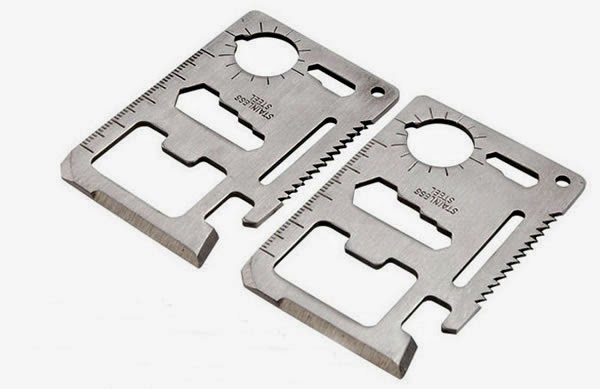
This multi-functional stainless steel credit card shaped survival tool is just like a miracle. Convenient and multi-functional pocket survival tool has below described functions. 

Credit Card Survival Tool Specification:

Credit Card Survival Tool Specifications

Can opener, Bottle opener, Ruler, Knife edge, Screwdriver, 4 position wrench, 2 position wrench, Butterfly screw wrench, direction auxiliary indication, Key chain hole. 
Pocket Survival Tool | Camping Gadgets

Card Sized Survival Tool Essential for Camping

Apple iOS 8 Can Scan Credit Card in Safari

Apple has recently revealed that their upcoming operating system iOS 8 have lot of fantastic features to surprise users but the most amazing feature is credit card scanning. The feature enables you to use the iPhone's camera to scan your credit-card when prompted by a website during online transactions.
iOS8 Credit Card Scanning

The feature of passwords and auto fill option already available in iOS 7, which allows you to store credit card details for future purchases online. The new feature uses character recognition to translate the image of your credit card into distinct numbers on your iOS device, according to 9 to 5 Mac.
Safari Credit Card Scanning In iOS8

There is also another less-publicized feature of iOS 8 is that it generates random media access control (MAC) addresses when scans for Wi-Fi networks, a dynamic that will make it slightly more difficult for marketing companies to track you via your MAC address. Given the many changes in iOS 8, a few more surprises will likely crop up in the coming weeks.

Share your reviews and ideas. . . !

Dropcam Wireless Video Monitoring Camera

Dropcam is a wireless camera that allows you to connect via Wi-Fi for Monitoring purposes. Recently company announced about Dropcam Cloud Recording that its subscribers will receive update of their software to support people detection. 
Dropcam wireless camera review

In shorts, the software would be able to tell the difference between your dog running across the room or a human walking through an open door and that’s really cool and incredible.

The ratings of Dropcam Pro and Dropcam are Amazon's best-selling products in the Camera and Photo section, and the brand is Amazon's best-selling surveillance camera.

The cameras are not only affordable but they are extremely easy to set up. All you have to do is just connect a Dropcam to your Wi-Fi and then configure the camera using your computer laptop or any of android device or IOS devices (iPhone and iPad, etc). 

You can use this camera in various ways like security camera, baby monitor and weather camera or as a way to easily monitor your pet activity. Users can tune in wand watch video streams live or also can also choose to capture or record video on the cloud, where they can be made public or private anytime. You can get live demo anytime on the official site of Dromcam. 

Terminator Telescopic Contact Lens

telescopic contact lens
Telescopic Contact Lens
Have you ever desired to have vision that could zoom in and out, like the Terminator? Well now maybe soon you can.

A team is working on a telescopic contact lens that is just over a millimeter thick. The lens is surrounded by a ring of movable components that magnify view by 2.8 times. As of yet, it is not able to compute the facial structure of what is being looked at but liquid crystal shutters allow the wearer to switch between normal and magnified vision. 

The contact lens was developed at the Swiss Federal Institute of Technology (EPFL) in Lausanne, Switzerland and at the University of California, San Diego by Eric Tremblay and his colleagues. The research and development for the project has been funded by DARPA.


So far the team has integrated the LCD shutter mechanism into a pair of modified Samsung 3D TV glasses. The lens has been tested on a mechanical model of the human eye and it is hoped that it won’t be too long before the LCD technology can be embedded directly into the lens itself, doing away with the 3D glasses.

According to New Scientist, the researches have said “Although the magnified images were clearly visible in our tests, acuity fell short of the design specification.” The team believe that if they can improve the refractive optics, then any diffraction related problems will be solved.

10Gbps Fiber Network by Google

Google is developing the equipment to boost internet speed up-to 10 Gbps of data for commercial and domestic use on its network and will deploy it faster than people expect.
Google Fiber Connection


The one and only fastest broadband internet provider in US is Google Fiber, but according to Mr. Patrick Pichette a Chocolate Factory's CFO, its 1 Gbps connection speeds are going to increase ten-fold.

Pichette told the Goldman Sachs Technology and Internet conference that the firm is actively developing the equipment to pump 10Gbps of data into homes and offices on its network and will deploy it faster than people expect.

Getting faster broadband into people's homes and businesses was vital to Google's own business, Pichette said. The more people used the internet, the better it is for Google, and he opined that cloud services would become much more popular if bandwidth lag were eliminated.

See Also:  Google Solar Energy Plants


While Google Fiber retains its speed advantage, the number of homes it actually reaches is tiny. The company set up a test network in Palo Alto in 2011 before rolling out its first commercial installation in Kansas City, Missouri, after strong public demand.

Next on the list for deployment is Austin, the cultural capital of Texas, and Google also spent one dollar buying up the municipal network of Provo, Utah, and will invest $18m in finding out where the network cables are and getting them up to speed.

Google's move into the ISP field was initially laughed at by the major network providers, but it has had an impact. Shortly after Google announced it was coming to Austin, AT&T told local residents that it would start a gigabit internet service of its own, albeit on a very small scale.

When asked if Google was planning other roll-outs for fiber, Pinchette refused to be drawn. "Stay tuned," he told the conference. ®

Apple Preparing Heart Attacks Prediction Sensors

Heart Attack Prediction Technology by Apple
According to a report, Apple is developing a sensor based wearable gadget that would be able to predict about heart attack. The effort, led by audio expert Tomlinson Holman, the creator of THX and 10.2 surround sound, can reportedly focus on the sound that blood makes as it travels through the arteries.

Apple's supposed sensor to monitor the sound of blood flowing, that device would probably ought to be worn on somebody's body. Therefore, this new information directly points to the continued rumors of an future Apple wearable gadget, normally stated as the iWatch.

The iWatch implications of the San Francisco Chronicle report are further backed by last week's news that Apple hired medical-device expert Marcelo Malini Lamego. What's more, a report in January claimed that Apple is also working on new health-focused apps for iOS.

If this new report regarding Apple's heart sensor research pans out — barring a surprise move by the company to enter the medical scanner bed industry — Apple's rumored iWatch will turn out to be far more broadly impactful than anyone could have guessed.

Nissan Smart Watch

Nissan is also in the era of wearable tech, with the smartwatch to connect the car and driver. It's first entry of Nissan into the wearable technologies world. Nissan will be showing off the device — dubbed the Nissan Nismo Watch — at the Frankfurt Motor Show. 

Nissan Smartwatch

Target of the Nismo Watch are drivers of Nissan Nismo cars. Nismo is Nissan's sports car and responsible for supercars, race cars and ridiculously tricked-out performance kits.

Right now, the Nismo Watch is focusing on really specific audience and its key features are quite different from normal smartwatches, so I think its about to connecting to your car instead of connecting to your smartphone. But still its really good that Nisan is also participating in the era of such technologies. 

Here are some features of Nismo Watch:

  • Connects to the car using a smartphone app as a Bluetooth Smart device. 
  • Access vehicle telematics and performance data while on the track. 
  • Nismo Watch will capture biometric data via a heart-rate monitor in the watch.
  • Monitor the performance of car with average speed and fuel-consumption readings
  • Get tailored car messages from Nissan


Nissan says that the Nismo Watch can also track and rate the user's social media performance across Twitter, Facebook, Pinterest and Instagram using its Social Speed software. Klout for cars? Who knew!

The Nismo Watch is an extension of Nissan's Nismo Lab, which launched earlier this year. The Nismo Lab is a mobile laboratory that captures live biometric and telematics data from Nismo athletes during races. With the Nismo Watch, Nissan hopes to make this sort of data available to the the drivers. With any luck, this sort of technology can also be used in other areas.

In the future, the Nismo Lab wants to focus on ECG, EEG and skin temperature sensors — so that that sort of data can get passed back to athletes via the smartwatch.

The Nismo Watch comes in black, white and black and red and it was designed to look like the Nismo ring. The watch is controlled with two buttons and should get over seven days of battery life with normal usage.

Even though this might be the most niche smartwatch of all time, we also think that the idea is pretty cool. The potential here — at least in a racing scenario — is to truly connect the car with the driver, letting the driver know what's happening with the car, but also by potentially providing team members with information about factors such as heart rate and temperature.

Historically, car companies use motor-sports as a way to test the most advanced and cutting-edge technologies, some of which eventually make their way to regular automobiles. So what do you think: Could you ever imagine getting information about your car from your watch? Or what about your car getting information about you? How cool would it be if the temperature could adjust itself based on body temperature? Let us know your thoughts in the comments.

Via: Mashable

New Frames For Google Glass, Prescription Lenses

Though Google glass's main appeal lies in the camera and the smart circuitry located above the right eye, at the end of the day smart-glasses are still glasses, and users would like to have options when it comes to frames and lenses.
Google has announced the Titanium Collection for Google Glass


Well, now they do. Google has announced the Titanium Collection for Google Glass, with four new extra-light titanium frames as well as two new styles of twist-on shades.

The new frame styles, which functions pretty much as your regular prescription frames, are named Split, Thin, Bold and Curve. Twist on shades are now available in a total of three varieties: Edge, Classic and Active. And even if you're not entirely satisfied with the choice, worry not: Google claims more styles will be coming.

The new styles will be available to Explorers (users who've participated in the Google Glass beta program) as a $225 upgrade option Tuesday afternoon. Qualified users who need prescription lenses and have vision insurance from VSP can get subsidized frames and lenses.
Source: Mashable

Lifeband Touch: LG Fitness Wristband Tracker

Here is a wearable gadget "Fitness Wristband Tracker" that LG announced at the 2014 International CES show, a version of its own with with some little changing in design with a touchscreen interface.
Lifeband Touch: LG Wristband Fitness Tracker

Here is a wearable gadget "Fitness Wristband Tracker" that LG announced at the 2014 International CES show, a version of its own with with some little changing in design with a touchscreen interface.

Called the LG Lifeband Touch, the device tracks distance walked, speed, calories and other typical data collected by activity trackers, but it also comes with an OLED display, manages incoming calls and can be used to control your music. 

This data can be accessed by swiping a finger over the display, similar to how you would use a
touchscreen; tablet or smartphone.
Fitness Wirst Band by LG

With the help of a motion-sensing algorithm, the device automatically turns on the display when the user rotates their wrist.

But one of the most compelling parts of the Lifeband Touch is how it connects to a smartphone via Bluetooth to receive data from third party devices, including the company's new heart rate earphones.
Images: LG

Omni Touch Turns Any Surface Into A Touchscreen

Technology comes a touchscreen onto your hand, clothes, a wall, or any surface, thus you'll operate your phone while not removing it from your pocket but this technology is still un-invented :( .
Turn Any Surface Into A Touchscreen

Imagine a world wherever any surface might potentially become a touchscreen for your phone: your hands, clothes, a wall or table. that is the vision behind a replacement Kinect-like technology known as Omni Touch, a wearable system that comes any multi-touch interface onto everyday surfaces, reports New mortal.

Perhaps the foremost convenient facet of the technology is however it may be operated on the go, requiring no special standardization for every new surface it's used on. The system adapts simply to surfaces of most textures in 3D area, thus it works even once the surface isn't flat, like together with your hand, or maybe a bole.
Turn Surface Into A 3D Touchscreen Area

The technology, that is primarily composed of a shoulder-mounted depth camera and a Pico-projector, was developed by researchers at Microsoft and could be a immense improvement over previous prototypes that would solely work on skin. A user study of the technology showed that dragging performance and bit accuracy approached the sensitivity of standard touchscreens.

The device conjointly permits for user flexibility so much on the far side the aptitude of your phone or pill. as an example, users will opt for the position and size of the projected interface, that means that they'll alter the scale of the screen to higher suite their wants and sight. Omni Touch is additionally itself capable of showing intelligence selecting the simplest show setting, that the user does not got to readjust with every new surface.

The only inconvenient facet of the paradigm is that the bigness of the camera and projector, that area unit mounted on a user's shoulder sort of a massive parrot. the nice news, though, is that future prototypes area unit expected to be a lot of smaller, nearer to the scale of a box.

An explanation video for Omni Touch

Google Solar Energy Plants

Google is investing $80 million in six new solar plants in California and Arizona that the company says will provide enough electricity for 17,000 homes in the United States.
Google Solar Energy Plants

Google Solar Energy Plants

The investment is Google's 14th in renewable energy. The company has so far put more than $1 billion behind solar and wind projects since April 2010. Google is partnering with investment firm KKR for the venture; the lead developer is Recurrent Energy.

According to a Google blog post, the projects have a combined capacity of 106 megawatts. A typical coal power station produces 600 to 700 megawatts while a nuclear power plant puts out 900 to 1,300 megawatts.

Google currently gets 33% of its energy from renewable sources, but hopes to be 100% renewable at some point.

Source: Mashable

Li-Fi: Alternate Of Wi-Fi Transmits Data 250 Times Faster Than Broadband

The quickest speed antecedent re-portable was 3Gbit/s, achieved earlier this year by the Fraunhofer physicist Institute in European nation. Chinese researchers conjointly claimed this month to possess created a 150 Mbp/s association; however some consultants were uncertain while not seeing any proof.
Li-Fi Technology is Alternate Of Wi-Fi

The term Li-Fi was coined by capital University's academician Harald Haas throughout a plug-ugly speak in the technology is additionally called actinic ray communications. 

Many consultants claim that Li-Fi represents the longer term of mobile web because of its reduced prices and larger potency compared to ancient Wi-Fi.

Both Wi-Fi and Li-Fi transmits information over the spectrum, however whereas Wi-Fi utilizes radio waves, Li-Fi uses actinic ray. This is often a definite advantage therein the actinic ray is much additional plentiful than the radio-frequency spectrum (10,000 times additional in fact) and may reach so much larger information density.
About Lifi Technology

Li-Fi signals work by shift bulbs on and off improbably quickly – too quickly to be detected by the human eye. This most up-to-date breakthrough builds upon this by victimization little micro-LED bulbs to stream many lines of knowledge in parallel.

The analysis was dole out by the radical Parallel actinic ray Communications project, a venture between the schools of Oxford, Cambridge, Edinburgh, St Andrews and Strathclyde, and funded by the Engineering and Physical Sciences analysis Council.

Existing junction rectifier lightweight bulbs may be reborn to transmit Li-Fi signals with one semiconductor unit, and also the technology would even be of use in things wherever radio frequencies can't be used for worry of busy with electronic equipment.

And though Li-Fi bulbs would have to be compelled to be unbroken on to transmit information, the bulbs may be dim to the purpose that they weren't visible to humans and however still useful. One draw-back is that the information receiver would have to be compelled to be seeable of the transmitter-bulb as actinic ray doesn't penetrate solid materials.

The makers of Li-Fi note that this quality may truly be a bonus in some eventualities, creating Li-Fi safer than Wi-Fi with hackers unable to access unsecured web connections from out of sight of the transmitter.

Rocket Engine Technique First Time Used Outside NASA


Students at the University of CA port of entry (USCD) have tested a liquid oxyacetylene, 3D written rocket employing a technique that has ne'er been wont to build a rocket before anyplace within the World except for NASA.
Rocket Engine Technique First Time Used Outside NASA

The students have designed and with success take a look at laid-off a rocket that uses fuel and LOX for the $6,800 that was prompt and partially funded by area Administration |NASA| independent agency} as a part of the Marshall Space Flight Center. The take a look at was devised to check whether or not or not 3D written components might really be used for a rocket.

The contraption used a fuel-oxidizer-oxidizer-fuel intel arrangement. The cooling jacket was ready to keep heat compartment-ed so the chamber walls were unbroken as cool as potential. throughout this method, skinny layers of atomic number 24 metal square measure repeatedly unfold and amalgamated to the element and also the excess powder is removed.

The ultimate piece has all temporary supports removed before being hardened, then polished and designed. The result's an especially fast and low cost thanks to build rocket components. By mistreatment 3D printing, build time for components may be reduced from weeks to hours.
Rocket Engine Technique Used Outside NASA

The fire take a look at that happened throughout the chums of Amateur technology launch was designed to check if the engines might power the third stage of a Nanosat launcher. These square measure solely needed to launch smaller satellites deliberation but one.33kg. As a result, the team came up with a rocket that's seven inches (17.7cm) long with a weight of solely 200lbs (90.7kg). NASA provided $5000 of the entire build prices with students raising the remaining cash by organizing varied fundraising activities.

The rocket, tagged Tri-D has well-tried that written engine components will so be used. this might mean the quicker manufacture of rockets at a immensely reduced value. For further details watch video below. 

GPS Bullets for Car Chases

GPS Bullets for Car Chases

Everyone loves a decent police chase; except, well perhaps the police and any pedestrians UN agency can be within the space. Whereas high-speed car chases is also exciting on the large screen, they're something however exciting to the cops in world. Over 360 officers area unit killed annually as a results of high-speed automobile chases. Those numbers may well be dynamic within the future, though, because of a more recent piece of police technology called the Star Chase System.


What is the Star Chase System?


Admittedly, this new piece of kit appears like it’s taken straight out of a fantasy moving picture. Employing a “cannon” mounted ahead of the grill on a prowl car, the Star Chase System uses compressed gas to shoot a GPS tag onto a targeted vehicle.

Once the GPS tag is connected, dispatchers will frequently monitor the whereabouts of the vehicle in question and relay the data to the officers concerned. This permits any police UN agency might are concerned in a very high-speed automobile chase to impede and wait till it's safe to create a stop.
Star Chase System

Currently, solely two states area unit testing out this equipment: Iowa and FL. If it proves in, though, the Star Chase System may beyond any doubt save a unnumerable variety of lives all told fifty states. It’s not simply the police and people {they area unit|they're} chasing UN agency are scraped or killed, though; it's conjointly any vehicles and pedestrians UN agency realize themselves within the middle of the pursuit. If it works, it feels like a no-brainier for each local department within the country to urge this instrumentation.

The only drawback is also it’s value effectiveness – every cannon system can reportedly value around $5000, which value doesn't embody any of the GPS tags which is able to value another $500. This quantity can for sure be troublesome for smaller cities and cities.

To view videos and facts about the Star Chase System, please visit Star Chase’s website.

[Image Source: TechBeat]

Nvidia Shield Plays Great, but Who Is It For?

Nvidia's Shield is a handheld gaming device that tries to do a lot of things at once. It plays Android games and media like a phone or tablet, but also streams high-quality games from a PC that work with its attached controller.
Nvidia Shield


While the Shield does many things well, it certainly isn't a product with mass-market appeal due to several factors. Between its $299 price, (which puts it out of range of an impulse buy), Android's weakness as a gaming platform, and the work you have to put in to stream PC games, it's a tough sell for all but the most hard-core gamers.
About Nvidia Shield

If handheld PC gaming is your bag, the Shield is worth investigating. The handheld does a lot very well, though it's not the game-changer Nvidia wants it to be.

The Beefy Shield


The first thing you'll notice about the Nvidia Shield is its heft. It isn't on the small side, making the term "handheld" almost a stretch. It clocks in at about 1.25 pounds, almost twice the 3DS XL (12 ounces) and a little less than a full sized iPad (1.33 pounds).

The Shield's 5-inch screen folds closed to make the console portable. Opening the lid reveals the full controller, with two analog sticks, directional pad, and A, B, X and Y buttons. There are also additional buttons for Shield functions on the controller's face, including the volume control, back and home buttons, and the a glowing Nvidia logo that launches the Shield's gaming hub. There are also triggers and bumpers on the Shield's rear.
Nvidia Shield makes the console portable

While all these are the trappings of a modern gaming controller, there are some differences. The most notable are the twin analog sticks, which are recessed to allow the Shield screen to fold down. The compact design makes these sticks strange to use; you'll have to stretch your thumbs a bit for great control.

The Shield's horizontal touch screen acts much like an Android device. You can control apps entirely from the screen, though one of the Shield's analog sticks can also act as a virtual cursor. The 5-inch screen's 1,280 x 720 resolution looks sharp, and games, movies and other media look great on it.

Android Gaming


The Shield's newest update, which arrived Monday morning, revs it up to Android 4.3 "Jelly Bean," and the physical design aside the handheld functions much like other stock Android devices. You'll be able to access Google Play for any media you choose to install, and apps like Hulu, Netflix, YouTube and Google Chrome work as they should.

Android has come a long way for games, but it's hard to review the Shield without pointing out the Android ecosystem is still not as diverse as Apple's, and that is painfully obvious in the gaming hemisphere. Great mobile games still arrive on iOS first, with Google Play teeming with knock-off titles.
Nvidia Shield Details

Nvidia has done its best to play curator by creating a Shield Store, which features all the 100+ games that support the Shield's control scheme. There are some bigger titles in here, like zombie shooter Dead Trigger, Grand Theft Auto: Vice City and racing title Asphalt 8. Many of these games are highly polished and make full use of the Shield's Tegra 4 processor.

The curated Shield store does offer brief descriptions of each game as well as prices, but you can't see information like ratings until you jump into Google Play to buy the game. The store would also benefit from the ability to sort games by rating, genre or price.

GamePad Mapper


Nvidia responded to users' complaints about a such a small pool of Android games having controller support by introducing a GamePad Mapper feature on Monday. The feature allows gamers to add controller support to any of their own Android games to adapt them to Shield, in theory.

When players start any unsupported game, they'll hit the Shield's start button and enter GamePad Mapper mode. Here they can assign virtual joysticks and buttons to real buttons on the Shield, and tie gestures or in-game actions to joysticks or buttons.
Details About Nvidia Shield

Mapping my first game (Plants vs Zombies 2) took a little bit of trial and error as I learned how each of the gizmos worked. It's not the smoothest process, but eventually I was able to get up and playing with the Shield's controller. For those not interested in a learning curve, previously created profiles from either the Nvidia team or other players are available to download once you load up GamePad Mapper.

This feature isn't perfect — it's putting a bandaid on the touch-to-controller problem until a game's original developers step in — but it works well enough for some games. I was able to lead the Houston Rockets to victory in NBA Jam on Android, a game that is usually frustrating because of its virtual controls. I can also imagine users coming up with some creative mapping to share with others if this is widely adapted.
Nvidia Shield PC Streaming

PC Streaming


The Shield's most touted feature is GameStream, the ability to stream games from a PC to the handheld's screen, allowing you to play high-quality titles around the house. It's a nice destination, but the journey is a huge pain.

To access PC streaming functionality, you're going to need a pretty solid gaming desktop with an Nvidia GeForce GTX 650 or better graphics card. You'll also need a wireless router that can broadcast at both 5GHz and 2.4GHz, aka simultaneous dual-band capability. The Shield can technically stream over just 2.4GHz, but the lag will be so bad Nvidia doesn't recommend it.

The setup of the Shield took some time, and getting every piece to work together felt like I was keeping several plates spinning at once. Nvidia does have most of the guides you'll need available online, but I ran into some specific problems that took a little good, old-fashioned trial and error.

Once you get GameStream up, it does work really well. I spent a couple hours playing Saints Row IV in the comfort of a couch in a different room from the PC. I could also manage my downloads and game library through Steam's Big Picture Mode, which also works on the Shield. The visuals looked really sharp, and the Sheild's onboard speakers actually sound crisp for their size. It's also worth noting that GameStream's signal worked more than 30 feet away from the PC — though any farther and I'd lose the signal.

There are about 50 games that officially support GameStream, though other games that have controller support might also work fine. (Saints Row IV wasn't in the "supported" list when I started testing, for instance.) Each game does present some of its own quirks though; there wasn't a button mapped for Borderlands 2's menus, where you manage your inventory and look at the game's map. Instead you have to double tap the screen to bring up a virtual keyboard, and hit "m" to go to the map. Yup. That's what I want to do every time I want to see where I'm going.

If you can put up with the work, GameStream is definitely Shield's killer feature. Now that it's officially "out of beta" we should see more PC titles supported as well.

Console Mode


Nvidia added the logical extension of GameStream to Shield with Monday morning's update: Console Mode. This turns Shield into a mini media machine, connecting to a TV through the Shield's HDMI output. You can even control the Shield via a third-party Bluetooth controller if you wish.

Console Mode is great for secondary functions like media viewing. Apps like Netflix, Hulu and Twitch scaled up easily, though I had to utilize the virtual cursor for some functions the controller wasn't programmed to do.

Some Android games worked really well, too, making them a big-screen experience that actually looked great. I was able to play Max Payne for Android and Star Wars Pinball while lounging in bed. I was able to play Max Payne for Android and Star Wars Pinball while lounging in bed. But plenty of games simply didn't work on big screen, including the aforementioned NBA Jam, which loaded in only a quarter of the screen, and Dead Trigger, which couldn't recognize any of the controller actions.

Console Mode can also be used with GameStream, though it's a very long daisy chain of devices to get it there. If your PC isn't in the same room as your TV, then I can see the appeal of having a device in the living room to send PC games too, though it's almost as funny to sync a Bluetooth controller to a device that already has a controller attached to it.

The streaming worked pretty well, though there was a small amount of lag when streaming about 15 feet away from the PC. It wasn't so bad that we couldn't keep playing, but situations that required more processing power would tax the system a bit.

It's also not going to be the highest resolution. Console Mode can only stream games at 720p to the television, though Nvidia said an update to support 1080p was in the works. This feature's timing is especially interesting considering Valve is about to beta-test its Steam Machines, which are computers meant to bring PC gaming into the living room through streaming.

Worth Noting


It should be said of course, that Nvidia provides companies like Mashable products for review, along with generally excellent support to make sure we get the most out of our testing.

Nvidia provided us a version of Monday's patch early. For reasons nobody is sure of, the patch bricked the Shield, freezing it on the startup screen despite multiple reboots. Nvidia quickly swapped our review unit with a brand new Shield, which handled the patch perfectly. This isn't to caution against installing the patch, but to state the surprising fact that if a Shield becomes bricked, there's no real way for its owner to reset the system. With another Android device, you could probably wipe it from a PC and reinstall the operating system, but this isn't the case for the Shield.

Conclusion


The Nvidia Shield is a solid performer with some great components. Its screen is beautiful, and the Tegra 4 handles games like a champ. PC streaming is a great idea, and looks beautiful when executed. But because of it's $299 price point, I wonder exactly who the Shield is for. That price doesn't reflect the fact you'll need a high-end graphics card and a $100+ router to access the Shield's biggest feature.

If you're a diehard PC gamer looking to move around your house more, or want to try streaming PC games to your television, the Shield is for you, though it's hard to say how big that market is. With the proliferation of other Android devices that work well for gaming, not to mention sub-$100 Android gaming consoles like OUYA and GameStick that can be used for media browsing, PC streaming would be the only reason to purchase a Shield, and even that has caveats.

The Good


Solid guts with great GPU

PC streaming has virtually no lag

Access to full Google Play

The Bad


Pricey

Finicky Console Mode

Recessed joysticks feel terrible after extended play

The Bottom Line

While the Shield is a great gaming device, it suffers from a high price point against an already crowded field of Android devices.

Have something to add to this story? Share it in the comments.

Image: Mashable

Apple Announced to end the Era of Paid Operating Systems

Amid a slew of incremental improvements to its iPad tablets and MacBook laptops, Apple today announced some landmark news about its oldest surviving operating system: It will not charge for the latest big upgrade, Mac OS X 10.9 Mavericks, breaking from a tradition that goes back 16 years and shining a light on a long-unfolding reversal in how tech profits are made. 
Apple ended the Era of Paid Operating Systems

Eighteen years ago, the tech industry’s dominant company made nearly half its revenue selling OS licenses. Now, as Apple just confirmed, the prices of OS licenses are headed towards zilch.

Prices of Apple’s Mac OS X have long been on the wane. After four releases that cost $129, Apple dropped the operating system’s upgrade price to $29 with 2009’s OS X 10.6 Snow Leopard, and then to $19 with last year’s OS X 10.8 Mountain Lion. Microsoft — the king of the operating system in the ’80s and ’90s and on into the aughts — still charges PC makers who sell the Windows OS preloaded on their desktop and laptop machines, but that business is shrinking, thanks in large part to the continued success of Apple. And just last week, Microsoft announced that, much like Apple, it would not charge consumers who upgrade their machines to the latest version of Windows, version 8.1.

Part of what’s going on here is that the low-cost mobile ecosystem has changed the way people think about operating system software. Smartphones and tablets have left traditional computers in the dust, and their operating systems and apps are overwhelmingly free. Upgrades to Apple’s iOS platform — which powers the company’s iPads tablets and iPhones — have long been free, as have new versions of Google’s Android mobile OS. Like Microsoft, Google supplies operating systems to outside hardware makers, but unlike Microsoft, it doesn’t charge them for the software. Phone and tablet makers can load Android on their devices for free.

So, as the mobile world takes off, it’s only natural that the desktop and laptop world would move towards the free model as well.

Microsoft’s OS sales once generated 47 percent of its revenue, but they contributed just 25 percent last year on decelerating Windows licensing (and even that figure is inflated by ad revenue from Windows Live). In response, Microsoft is restructuring as a “devices and services” business — meaning a company that sells hardware like the Xbox and web services like Azure. In other words, it’s becoming more like Apple. Apple isn’t really a software company. It makes software and services that run on its own hardware devices.

In a way, operating systems are returning to their roots as a kind of loss leader. Before the personal computer revolution of the late 1970s, operating systems were just one piece in a vertically integrated stack of technology, a stack that also also included hardware and support services. Operating systems like Unix and VMS were used to sell minicomputers and workstations, and companies made their profits on hardware and support contracts. OSes such as BSD UNIX were completely free, and programmers would pass them around at will. Under the same philosophy, Apple gave away new versions of its Macintosh operating system until the crisis years of the late 1990s, when hardware sales slowed dramatically.

In the rapidly developing smartphone and tablet markets, tightly-coupled stacks are once again dominant, so OS makers can subsidize their operating systems with profit from the products integrated into them. Google, for example, subsidizes its mobile OS by selling online ads, and, in theory at least, by selling Motorola-branded hardware. Apple’s iPhone profits come from hardware and service sales, not the OS.

“The $0 [Mavericks] price is linked to the trend towards vertical integration,” says programmer and longtime OS X watcher John Siracusa. “A company that makes both the hardware and the software for a device can choose where to put its profit margins. Given the proven magic of ‘free’ in the minds of consumers, it’s better to put all the profit in a single basket. Free hardware is difficult to pull off, so software gets the nod: buy our hardware, get our software for free.”

Yes, even Microsoft is moving towards the vertical stack. It recently acquired phone maker Nokia and sells its own tablets. But this game of cross-subsidizing the operating system will be tougher for Microsoft, since the company is no Apple when it comes to hardware — and no Google when it comes to online services. The company rose to prominence in the horizontal PC era, when Microsoft could play one hardware vendor against another, dictate prices, and keep a computer’s hefty OS markup hidden from consumers. Those were the days.

“The OS always ‘seemed’ free. You got it with your computer,” says former Microsoftie Joel Spolsky. “Doesn’t mean it wasn’t a profit center. Probably the only people who noticed the price of Windows were the people who went out to the store to buy a newer OS for their older computer to upgrade it, but I don’t think that was a super-mainstream thing to do. Most people didn’t upgrade their OS until they got a new computer.”

So to the average consumer, the 21st Century sea change in OS pricing might not be particularly apparent. But to Microsoft shareholders, it will look very real and very scary. The company must make up that 25 percent somewhere else.

Netgear Push 2 TV PTV3000

Android 4.2 Jellybean brought along the concept of Wireless Display through Miracast to the smartphone market. Wireless Display technology lets you directly stream your content on a device to either a TV or Monitor with HDMI input. The Netgear Push2TV is on close lines with Google Chromecast.
Netgear Push 2 TV PTV3000


The Netgear Push2TV is available for US $59.99 and roughly putting it in INR, it amounts to Rs. 3500 which makes it quite a costly purchase. The Push2TV PTV3000 is compatible with Miracast and WiFi Direct.

Design, Build 


The Netgear Push2TV PTV3000 is a small box that comes with a miniUSB port and a HDMI port at the back. The black box has a Netgear branding at the top and a small LED notification light on the front side. On the right side, we have a small button which is used to enable the WPS that has to be used when upgrading the firmware.

Setting up Netgear Push2TV PTV3000


Getting started with the Netgear Push2TV PTV3000 is quite easy. You need to connect the mini USB cable at the back of the device and use the charger given with the device to connect it to the power supply. Then using a HDMI cable, connect the Netgear’s HDMI port to that of the TV. If done correctly, the TV should show that your device is ready.

Once the TV is ready, then you can goto Wireless Display settings on your phone or tablet(Screen Mirroring in Samsung) and enable it. You will find the PushTV device and once connected, you will automatically be able to view the screen of your device on the TV.

The Netgear PTV3000 streams both Video and Audio (support up to 5.1 surround sound) via HDMI offering a total media experience.

Quality


We tried out the Netgear Push2TV PTV3000 with a lot of devices and found that the quality of the streamed content depends on the phone and the content being streamed. We tried it first with Google’s Nexus 4. The UI was sluggish and laggy. Then we tried streaming videos which were also slighty laggy because of lower bitrates and dropped frames. Gaming was very bad because the content being streamed on TV seemed very behind the actual content on the phone, so playing games using the Miracast wouldn’t be the best of options on the Nexus 4.

Then we tried out the PTV3000 with a couple of other MediaTek powered devices – Oppo R819(MT6589) and Gionee Elife E5(MT6589T). In this case, the UI was better and relatively smoother although there were a few lags. In terms of video, it was much better. There were frame drops, but far less noticeable than on the Nexus 4. If you watch the phone and the TV simultaneously (which is not the practical usage scenario), then you may notice a difference in the video content being streamed. However, in the ideal scenario where you will just be watching the TV, the video content seems pretty good. In terms of gaming with the these two devices, there was lag in the gameplay, but games were playable by watching just the TV.

Conclusion


The Netgear Push2TV PTV3000 is an expensive way to stream data from your phone or tablet to your local TV in a wireless manner.
 

Popular Posts